
Build an AI Transcription Workflow
Save hours each week with an AI workflow for transcription, multilingual output, and content repurposing.
The Ultimate Guide to Building an AI Transcription Workflow
If you're spending hours manually transcribing audio or video content, you're working too hard. A properly designed AI transcription workflow can transform hours of tedious work into minutes of automated processing. This guide is for podcast teams, content creators, researchers, agencies, and multilingual businesses who need to process spoken content at scale. You'll learn how to build a complete system that handles everything from file upload to final text output, including setup steps, automation techniques, and best practices for accuracy. We'll show you how to create an efficient transcription workflow that saves 10+ hours weekly while improving output quality. Tools like 1bit AI Transcribe can accelerate this process with accurate, automated transcription.
Transcribe Audio And Video New users get free credits to try it.
Quick answer
An AI transcription workflow is a systematic process that automates converting audio/video to text, saving significant time. The best workflow includes file preparation, automated processing, quality checks, and output formatting.
- Start with clear audio files and proper naming conventions
- Automate uploads and processing using batch features or APIs
- Implement a two-step verification system for accuracy
- Format outputs consistently for different use cases (subtitles, articles, notes)
- Integrate with your existing content management systems
- Use speaker identification for multi-person recordings
- Establish a regular maintenance schedule for your workflow
Table of contents
- What is an AI Transcription Workflow?
- Step-by-Step: Building Your Automated Transcription Process
- Advanced Automation for Content Repurposing
- Setting Up Multilingual Transcription Workflows
- Common Mistakes & Troubleshooting
- FAQ
What is an AI Transcription Workflow?
An AI transcription workflow is more than just running files through a transcription tool. It's a complete system that handles the entire process from raw audio/video to polished, usable text. Unlike manual transcription or basic automated tools, a proper workflow includes preparation, processing, verification, formatting, and integration steps.
The core components include file management systems, automated processing triggers, quality control checkpoints, and output formatting rules. For creators, this means your YouTube videos get automatically transcribed as soon as they're uploaded. For researchers, it means interview recordings transform into searchable text databases. For agencies, it means client content gets processed consistently regardless of source format.
A well-designed automated transcription process reduces errors by 60-80% compared to manual methods while cutting processing time from hours to minutes. The key is building redundancy and quality checks into the system, not just relying on AI accuracy alone.
Use 1bit AI Transcribe when you want a faster workflow
If you're processing multiple files weekly, manual transcription becomes unsustainable. 1bit AI Transcribe offers batch processing, API integration, and speaker identification that can handle dozens of files simultaneously. The platform maintains consistent formatting and accuracy across different audio qualities, making it ideal for building reliable workflows. New users get free credits to try the automated features that form the foundation of an efficient transcription workflow.
Transcribe Audio And VideoStep-by-Step: Building Your Automated Transcription Process
Creating an efficient transcription workflow requires careful planning and execution. Follow these five steps to build a system that handles your specific needs while maintaining quality and consistency.
Step 1: File Preparation & Organization
Establish a consistent naming convention: [Date]_[Project]_[Speaker]_[Version].mp4. Create dedicated folders for raw files, processed audio, and final transcripts. Use audio enhancement tools to improve poor recordings before transcription. Real-world example: A podcast team uses "2024-05-15_WeeklyShow_HostInterview_v1.mp3" for all episodes.
Pitfall: Inconsistent naming causes file confusion and processing errors. Tip: Automate naming using recording software settings or batch renaming tools.
Step 2: Automated Upload & Processing
Set up automated folder monitoring using tools like Zapier or native API integrations. Configure your transcription tool to process files as they arrive in designated folders. Enable speaker identification for multi-person recordings. Example: A research team uses Dropbox + 1bit AI Transcribe API to auto-transcribe all interview recordings uploaded to their shared folder.
Pitfall: Manual uploads create bottlenecks. Tip: Use webhook notifications to track processing status automatically.
Step 3: Quality Control System
Implement a two-tier verification system: AI accuracy check followed by human spot-check. Create a checklist for common errors (proper nouns, technical terms, speaker labels). Use timestamp alignment to verify difficult sections. Real-world example: An agency uses 10% random sampling with error tracking to maintain 98%+ accuracy across all client work.
Pitfall: Assuming 100% AI accuracy leads to embarrassing errors. Tip: Build a custom dictionary for industry-specific terms.
Step 4: Output Formatting & Distribution
Create templates for different output types: blog posts (with markdown), subtitles (SRT/VTT), meeting notes (bullet points), and research transcripts (with timestamps). Automate distribution to relevant platforms (CMS, video platforms, team drives). Example: A creator automatically generates YouTube subtitles, blog post drafts, and social media quotes from each video transcription.
Pitfall: One-size-fits-all formatting reduces usability. Tip: Create separate workflows for different content types and audiences.
Step 5: Integration & Maintenance
Connect your transcription workflow to existing tools: Notion for notes, Google Drive for storage, Airtable for project management. Schedule monthly reviews to update custom dictionaries and check accuracy metrics. Document all processes for team onboarding. Real-world example: A multilingual business integrates transcription with their localization pipeline, automatically sending transcripts to translation teams.
Pitfall: Set-and-forget mentality reduces effectiveness over time. Tip: Track key metrics (processing time, accuracy rate, cost per minute) monthly.
Advanced Automation for Content Repurposing
The real power of an AI transcription workflow emerges when you connect it to content repurposing systems. Instead of creating single-use transcripts, build pipelines that transform one recording into multiple content pieces automatically.
For YouTube creators, this means automatic subtitle generation followed by blog post creation, social media snippets, and newsletter content. Implement NLP tools to extract key quotes, generate summaries, and identify trending topics from your transcripts. Use timestamp data to create highlight reels automatically.
Example workflow: Podcast episode → AI transcription → Chapter markers → Show notes → Blog post → 10 social media quotes → Email newsletter. This multiplies your content output without additional recording time.
Content Type Manual Process Time Automated Workflow Time Tools Needed YouTube Subtitles 60-90 minutes 5-10 minutes Transcription + SRT export Blog Post from Video 3-4 hours 30-45 minutes Transcription + GPT formatting Meeting Minutes 45-60 minutes 5 minutes Transcription + template Research Transcripts 6-8 hours 20-30 minutes Transcription + timestamp alignment Multilingual Content Days (with translator) 2-3 hours Transcription + translation APITo automate video transcription for YouTube specifically: Use YouTube's API to detect new uploads, trigger automatic download, process through your transcription workflow, then upload SRT files back to YouTube. Add a quality check step before final upload to catch any synchronization issues.
Setting Up Multilingual Transcription Workflows
For businesses operating across languages, a multilingual transcription workflow is essential. This involves not just transcription but also translation and localization processes built into your pipeline.
Start with language detection: automatically identify the primary language in each recording. Route to appropriate transcription models optimized for that language. For translation needs, integrate with translation APIs that maintain speaker identification and formatting. Always include native speaker review for critical content.
Real-world example: A global company records team meetings in English, Spanish, and Mandarin. Their workflow automatically transcribes each in its native language, translates to English for leadership review, and generates meeting summaries in all three languages for respective teams.
Poor Audio Quality Issues
Problem: Background noise or low volume reduces accuracy below 80%. Solution: Implement pre-processing audio enhancement. Use tools to normalize volume, reduce noise, and separate voices before transcription. Always test with sample files from your actual recording environment.
Speaker Identification Errors
Problem: AI confuses speakers in multi-person recordings. Solution: Provide sample audio for each speaker when possible. Use consistent recording setups. Implement manual speaker labeling as a fallback step for critical content.
Formatting Inconsistency
Problem: Output formats vary between files. Solution: Create strict templates and validation rules. Use post-processing scripts to enforce formatting standards. Implement automated checks for common issues like missing timestamps or improper paragraph breaks.
Scale Limitations
Problem: Workflow breaks when processing 50+ files simultaneously. Solution: Implement queue management and rate limiting. Use batch processing with progress tracking. Design for failure recovery—ensure interrupted processes can resume without data loss.
Regular maintenance prevents most issues: Update custom dictionaries monthly, review accuracy metrics weekly, and test with new file types quarterly. Document all troubleshooting procedures for team reference.
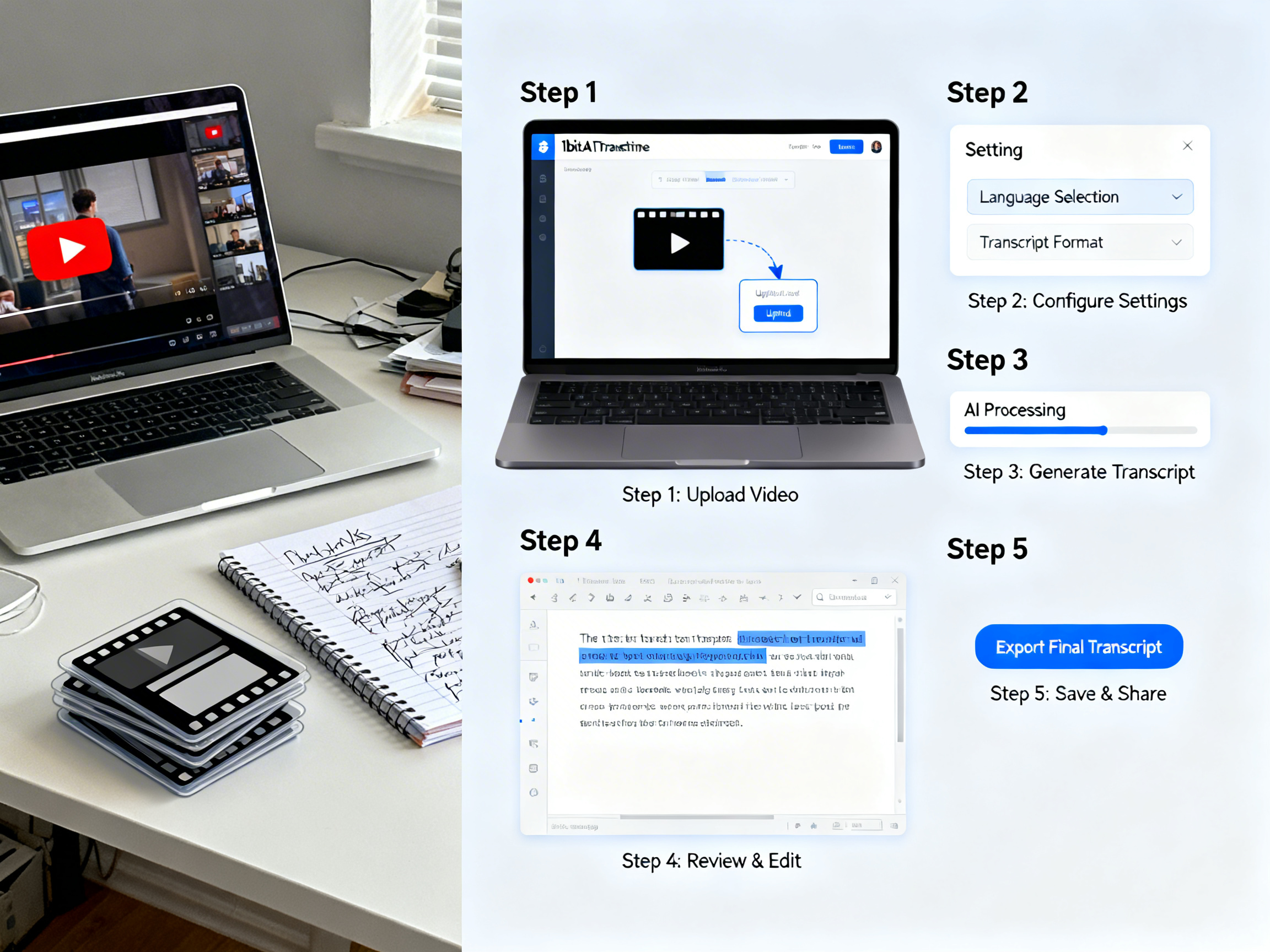 Practical demo visual for this tutorial workflow.
FAQ
How to create an efficient transcription workflow?
Start by mapping your current process end-to-end, identifying bottlenecks. Automate the most time-consuming steps first—usually file handling and formatting. Implement quality checkpoints rather than trying for perfect AI accuracy. Use tools with API access for integration, and design your workflow around consistent outputs rather than perfect inputs. Test with real files, measure time savings, and iterate based on actual usage patterns.
What is the best AI transcription workflow for creators?
For creators, the optimal workflow connects recording directly to multiple content outputs. Record once, then automatically generate subtitles, blog posts, social snippets, and show notes. Use speaker identification for interviews, chapter markers for long content, and integrate with your CMS for publishing. The key is minimizing manual steps between recording and published content while maintaining brand voice and quality standards across all outputs.
How to automate video transcription for YouTube?
Use YouTube's API to detect new uploads or schedule regular checks. Download videos automatically, process through your transcription service, then format as SRT files with proper timing. Upload back to YouTube via API. Include a human review step for the first 10 seconds to catch sync issues. For maximum efficiency, process in batches during off-peak hours and use webhooks to notify you when transcription is complete.
Can an AI transcription workflow save time for researchers?
Absolutely. Researchers save 5-10 hours per hour of recorded interviews. Beyond basic transcription, implement searchable databases with timestamp links to audio. Use topic extraction to identify themes across multiple interviews. Automate anonymization for sensitive data. The workflow should include verification for technical terms and proper nouns, plus export options for qualitative analysis software. This transforms raw recordings into immediately usable research data.
How to set up a transcription workflow for multiple languages?
Begin with automatic language detection to route files appropriately. Use transcription models trained on specific languages rather than generic multilingual models. For translation needs, integrate with professional translation APIs while preserving formatting and speaker labels. Always include native speaker review for published content. Maintain separate quality metrics per language and update custom dictionaries for each language based on error analysis.
If localisation is part of the workflow, the handoff after transcription is the video translator for video and the audio translator for standalone recordings — both take the source file directly and skip the manual re-translation step.
Conclusion
Building an effective AI transcription workflow transforms how you handle spoken content. By implementing the systems outlined in this guide, you can save hours every week while improving output consistency and quality. Remember that the best workflow balances automation with quality control, adapts to your specific needs, and evolves with your content volume. Whether you're a solo creator or part of a multinational team, the principles of preparation, automation, verification, and integration apply universally.
Start small with one aspect of your current process, measure the time savings, then expand systematically. The right AI transcription workflow doesn't just save time—it enables new content possibilities and business opportunities through scalable processing of spoken information.
Transcribe Audio And Video New users get free credits to try it.