How to Make a 3D Blind Box Avatar from Photo: Step-by-Step Tutorial
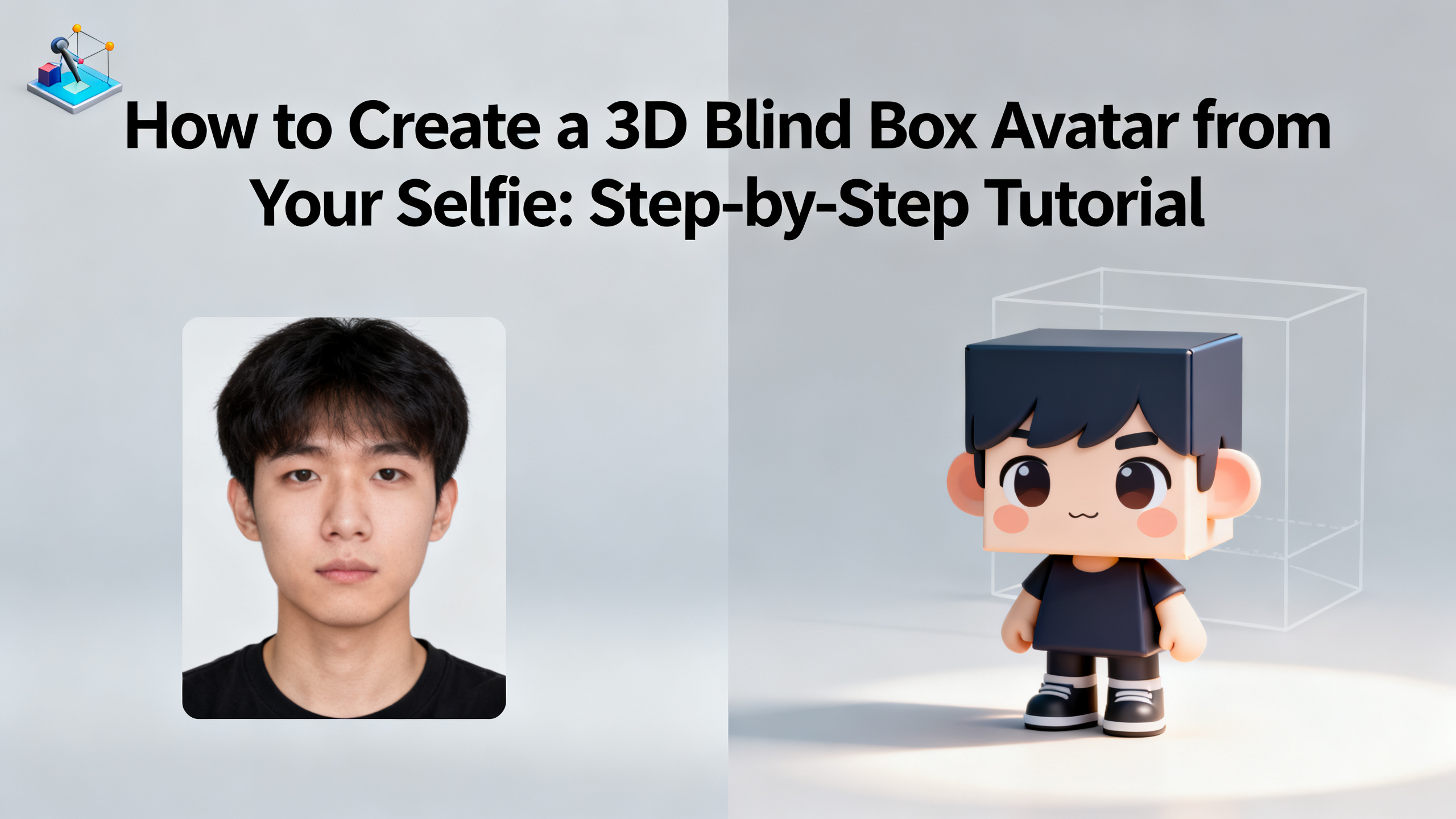
Ever wondered how to turn a simple selfie into a collectible 3D blind box avatar that looks like it came straight from Pop Mart? You're not alone. Illustrators, anime fans, ecommerce sellers, and social creators are all jumping on the trend of stylized toy art avatars. In this tutorial, you'll learn exactly how to make a 3D blind box avatar from photo using AI—no sculpting skills required. We'll walk through the entire process, from choosing the right photo to generating a finished avatar that's ready for your profile, store, or collection. By the end, you'll have a clear, repeatable workflow and know exactly which AI cartoon generator delivers the best results for this specific style.
Quick Answer: How to Make a 3D Blind Box Avatar from Photo
To make a 3D blind box avatar from a photo, upload a clear front-facing selfie to an AI cartoon generator like 1bit AI, select the "3D Blind Box" style preset, adjust facial features and accessories, then generate and download your avatar. The entire process takes under 5 minutes and requires no design experience.
- Use a well-lit, front-facing photo with a neutral expression for best results.
- Choose a 3D blind box style preset that mimics collectible toy aesthetics.
- Customize hair, eyes, outfit, and accessories to match your personality or brand.
- Generate in high resolution (1024x1024 or higher) for social media or print use.
- New users get free credits to try it—no upfront payment needed.
What Is a 3D Blind Box Avatar and Why Is It So Popular?
A 3D blind box avatar is a stylized digital character that mimics the look of collectible toy figures sold in blind boxes—like those from Pop Mart, Sonny Angel, or Labubu. These avatars feature exaggerated proportions, glossy textures, and cute, minimalist facial features that make them instantly recognizable as "toy art." The trend has exploded on social media, with creators using these avatars as profile pictures, brand mascots, and even merchandise designs.
The appeal lies in the blend of personalization and collectibility. When you turn a selfie into a 3D blind box avatar, you're not just creating a cartoon—you're creating a unique piece of digital art that feels like a limited-edition figure. Ecommerce sellers use them to humanize their brand, anime fans adopt them as online personas, and illustrators use them as base models for further design work. The best part? You don't need to know how to sculpt or render 3D models. With an AI cartoon generator like 1bit AI, you can achieve professional-grade 3D blind box art in minutes.
Use 1bit AI Cartoon Generator When You Want a Faster Workflow
Instead of spending hours learning 3D software or hiring a freelance illustrator, you can upload your photo to 1bit AI and get a ready-to-use 3D blind box avatar in under 5 minutes. The AI handles the heavy lifting—lighting, shading, texture mapping—so you can focus on creative choices like outfit and accessories. New users get free credits to try it, making it risk-free to experiment with different styles.
Make Cartoon ArtStep-by-Step Tutorial: How to Make a 3D Blind Box Avatar from Photo
Follow these 6 steps to turn your selfie into a stunning 3D blind box avatar using an AI cartoon generator. We'll use 1bit AI as the example tool, but the principles apply to any good AI generator.
- Choose the Right Photo: Start with a high-resolution, front-facing selfie. Avoid heavy shadows, sunglasses, or extreme angles. The AI needs a clear view of your face to map features accurately. A plain background helps the AI focus on you.
- Upload to the AI Cartoon Generator: Go to 1bit AI's cartoon generator and upload your photo. The interface is drag-and-drop simple. Wait for the AI to analyze your facial structure—this takes about 2 seconds.
- Select the 3D Blind Box Style Preset: Look for a style labeled "3D Blind Box" or "Toy Art." This preset applies the signature glossy texture, large head-to-body ratio, and simplified facial features that define the blind box aesthetic. If you don't see it, choose a "3D Cartoon" style and adjust the settings manually.
- Customize Features and Accessories: Most AI generators let you tweak hair color, eye shape, outfit, and background. For a true blind box look, opt for oversized eyes, a small nose, and a cute smile. Add accessories like a hat, glasses, or a prop to make it unique.
- Generate and Review: Click generate and wait 10-30 seconds. Review the output. Check that the facial features resemble you and that the 3D effect looks cohesive. If something is off, adjust the prompt or try a different photo.
- Download and Use: Once satisfied, download your avatar in high resolution (at least 1024x1024). Use it as a profile picture, print it on merchandise, or share it on social media. The file is typically a PNG with a transparent background, perfect for layering.
Pro tip: If you want to create a series of avatars for a brand or collection, use the same base photo but vary the accessories and backgrounds. This gives you a consistent "line" of blind box characters.
Best AI Cartoon Generator for 3D Blind Box Art: Features Compared
Not all AI cartoon generators are created equal when it comes to 3D blind box art. Some excel at realism, others at anime styles. Here's a comparison of key features you should look for.
| Feature | 1bit AI Cartoon Generator | Generic AI Avatar Tools |
|---|---|---|
| 3D Blind Box Style Preset | Yes, dedicated preset | Rarely available |
| Customization Options | Hair, eyes, outfit, accessories, background | Limited to basic filters |
| Output Resolution | Up to 2048x2048 | Often 512x512 max |
| Free Credits for New Users | Yes | Rarely |
| Batch Generation | Yes (for series) | No |
When choosing a tool, prioritize those that offer a dedicated 3D blind box style preset and high-resolution output. This ensures your avatar looks polished and professional, whether you're using it for a profile picture or product mockup.
Common Mistakes When Turning Selfies into Toy Art (and How to Fix Them)
Even with the best AI, you can run into issues. Here are the most common pitfalls and how to avoid them.
- Mistake 1: Using a low-quality photo. Blurry or pixelated images lead to distorted avatars. Fix: Always upload a photo with at least 800x800 resolution and good lighting.
- Mistake 2: Over-customizing. Adding too many accessories or extreme features can make the avatar look messy. Fix: Stick to 2-3 key accessories that define the character.
- Mistake 3: Ignoring the background. A busy background confuses the AI. Fix: Use a plain, light-colored background or let the AI generate a clean one.
- Mistake 4: Not checking the output. AI can sometimes misplace facial features. Fix: Always review the generated avatar and regenerate if needed.
- Mistake 5: Expecting a perfect replica. The AI stylizes your features—it won't be a photorealistic 3D scan. Fix: Embrace the toy-like charm; that's the whole point.
If you encounter persistent issues, try a different photo or adjust the style preset. Most AI cartoon generators, including 1bit AI, allow you to tweak parameters until you're happy.
Real-World Use Cases: Where to Use Your 3D Blind Box Avatar
Your 3D blind box avatar isn't just a fun experiment—it's a versatile asset. Here are five practical applications:
- Social Media Profile Pictures: Stand out on Instagram, TikTok, or Twitter with a unique, branded avatar that reflects your personality.
- Ecommerce Brand Mascots: Use the avatar as a friendly face for your online store. It builds trust and makes your brand memorable.
- Merchandise Design: Print your avatar on stickers, t-shirts, or phone cases. The 3D blind box style translates beautifully to physical products.
- Gaming Avatars: Use it as a profile icon in games like Roblox or VRChat. The toy aesthetic fits perfectly in virtual worlds.
- Digital Art Collections: Create a series of avatars for friends, family, or clients as a fun, personalized gift.
Ready to Try 1bit AI Cartoon Generator?
New users get free credits to try it. Upload your first selfie and see how quickly you can create a professional 3D blind box avatar. The style preset does all the heavy lifting—you just pick the accessories.
Make Cartoon Art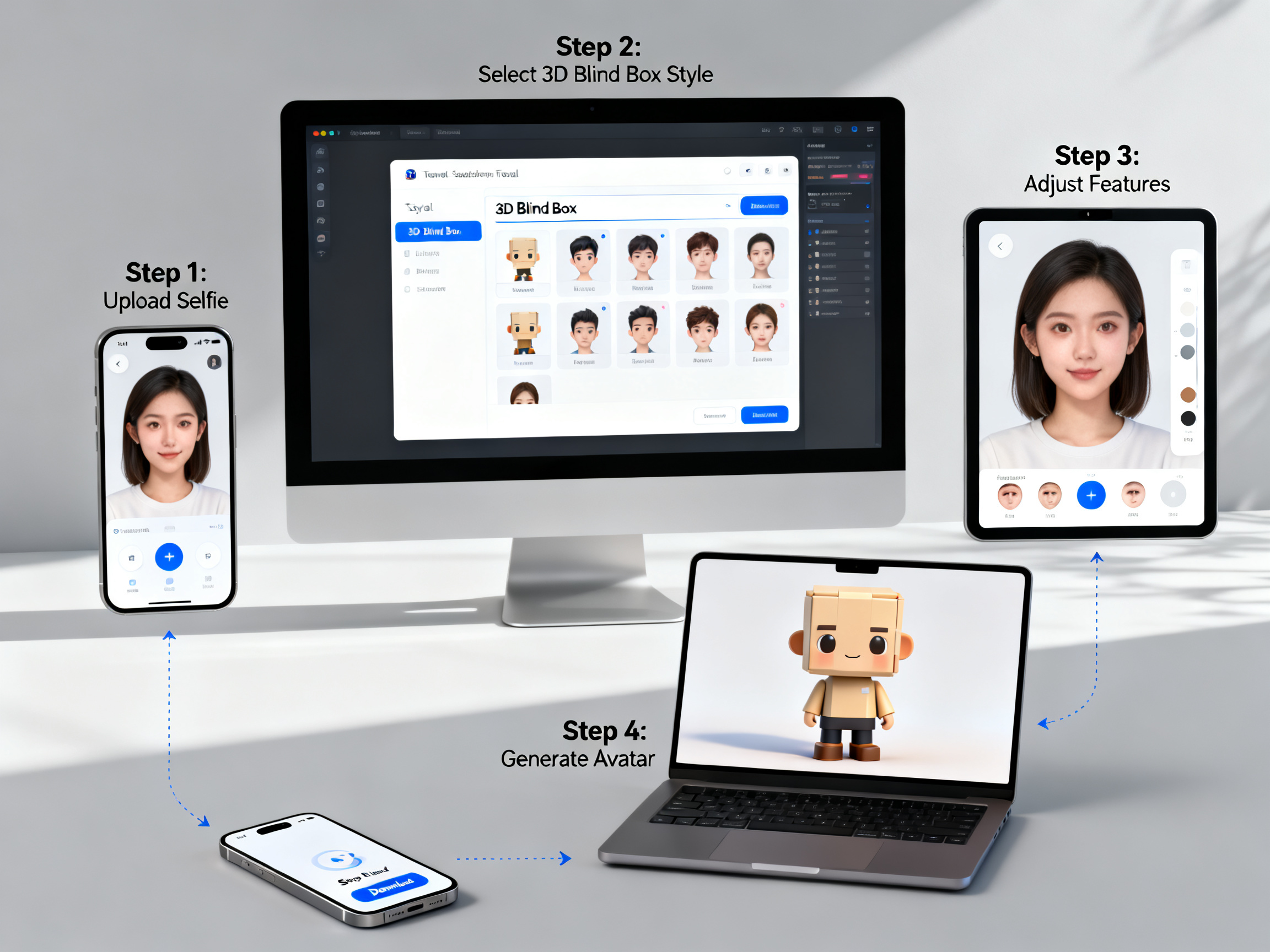
FAQ: How Do I Turn a Photo into a 3D Blind Box Avatar?
How do I turn a photo into a 3D blind box avatar?
Upload a clear front-facing selfie to an AI cartoon generator like 1bit AI, select the 3D blind box style preset, customize features like hair and accessories, then generate and download your avatar. The process takes about 5 minutes and requires no design skills.
What is the best AI for 3D blind box art?
1bit AI Cartoon Generator is a top choice because it offers a dedicated 3D blind box style preset, high-resolution output up to 2048x2048, and extensive customization options. New users also get free credits to test the tool before committing.
Can I use my 3D blind box avatar for commercial purposes?
Yes, most AI cartoon generators, including 1bit AI, grant full commercial rights to generated images. You can use your avatar on merchandise, in ads, or as a brand mascot without additional licensing fees.
What photo works best for turning selfies into toy art?
A high-resolution, front-facing selfie with neutral lighting and a plain background works best. Avoid sunglasses, heavy shadows, or extreme angles, as these can confuse the AI and result in distorted features.
How long does it take to generate a 3D blind box avatar?
The AI generation itself takes 10-30 seconds. Including photo upload and customization, the entire process typically takes 3-5 minutes. Batch generation for multiple avatars may take slightly longer.
Can I create a series of 3D blind box avatars with different outfits?
Absolutely. Use the same base photo and vary the accessories, outfits, and backgrounds. This creates a cohesive "collection" of avatars that look like they belong to the same blind box series.
Conclusion: Start Creating Your 3D Blind Box Avatar Today
Learning how to make a 3D blind box avatar from photo is easier than ever with modern AI cartoon generators. Whether you're an illustrator looking for a quick base model, an anime fan wanting a unique profile picture, or an ecommerce seller building a brand mascot, the process is fast, fun, and highly customizable. Remember to start with a good photo, choose the right style preset, and customize thoughtfully. With 1bit AI, you get a dedicated 3D blind box style, high-resolution output, and free credits to get started. Don't wait—turn your selfie into toy art today.