
Remove Objects from Photos with AI
Erase unwanted objects, text, and defects from photos using AI editing and magic eraser tools.
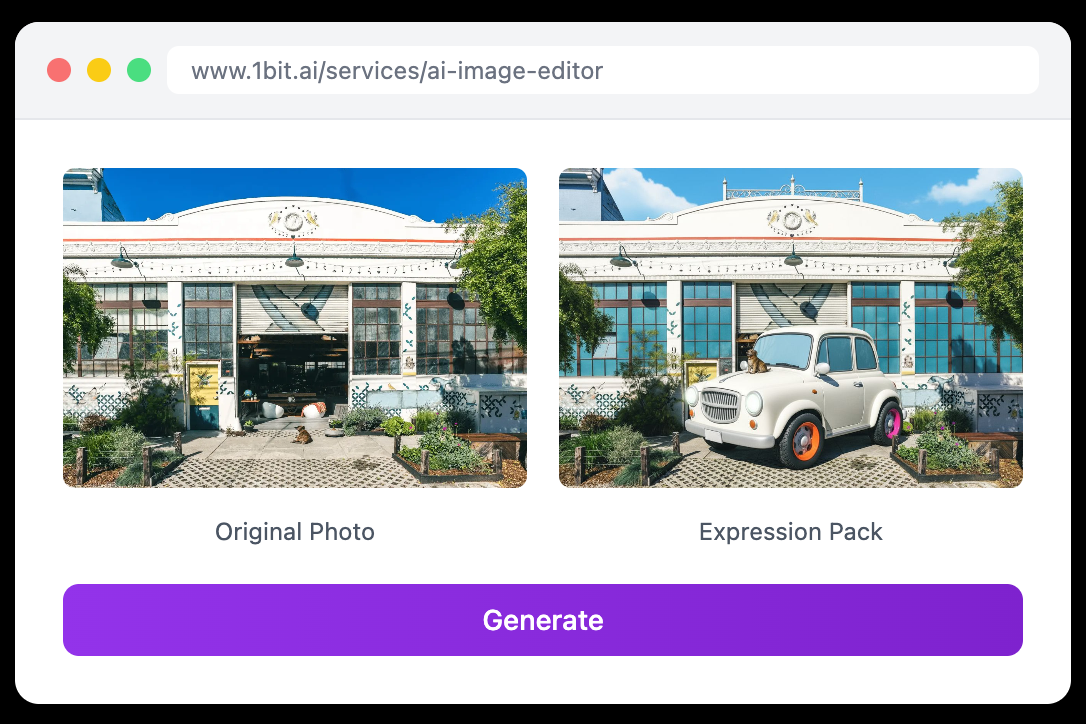
Fix Your Photos Instantly: Remove Objects and Retouch with AI
Don't let a stray trash can or a photobomber ruin your perfect shot. Clean up your images in seconds with 1bit.ai.
We have all been there. You take the perfect photo—the lighting is great, the angle is flattering—but then you notice it. A stranger walking in the background, a distracting power line, or a messy table cluttering the frame.
In the past, fixing this required expensive software like Photoshop and hours of learning how to use the "Clone Stamp" tool. Today, you can solve it in three seconds.
Meet the 1bit.ai AI Image Editor, your smart assistant for effortless photo cleanup and retouching.
What Can You Do with an AI Image Editor?
AI editing isn't just about filters; it's about reconstructing reality to match your vision. Our tool uses advanced generative algorithms to "fill in" the gaps when you remove an object, making it look like it was never there.
1. Remove Unwanted Objects (The Magic Eraser)
Did a tourist wander into your landscape shot? Is there a date stamp or watermark on your own image that you lost the original of? Simply brush over the object, and the AI will analyze the surrounding pixels to erase it seamlessly.
2. Professional E-Commerce Cleanup
For online sellers, presentation is everything. Use the AI editor to remove dust specks, scratches, or distracting props from your product photos. A cleaner image leads to higher conversion rates on platforms like Shopify and Amazon.
3. Text and object cleanup
Have an old meme or a saved graphic where the text ruins the visual? The AI understands texture and background patterns, allowing you to wipe away text without leaving a blurry smudge behind.
How It Works: No Skills Required
The best part about the 1bit.ai Image Editor is the simplicity. You don't need to understand layers or masking.
- Step 1: Upload. Drag and drop your image directly into the browser.
- Step 2: Brush. Use the cursor to highlight the object, person, or defect you want to remove.
- Step 3: Process. Hit the button and watch the AI reconstruct the background instantly.
"I used to pay retouchers $50 per photo to clean up my real estate shots. Now I do it myself in 2 minutes using AI."
Give Your Photos a Professional Polish
Stop deleting "almost perfect" photos. Fix them instead.
Start Editing for Free