

Works in Canva
Product Infographic for Canva
Turn product photos and key features into clear infographics inside Canva.
Product Infographic is in review with Canva and will be available soon.
Free Canva account is enough · Free credits to start · Cost shown before every generation
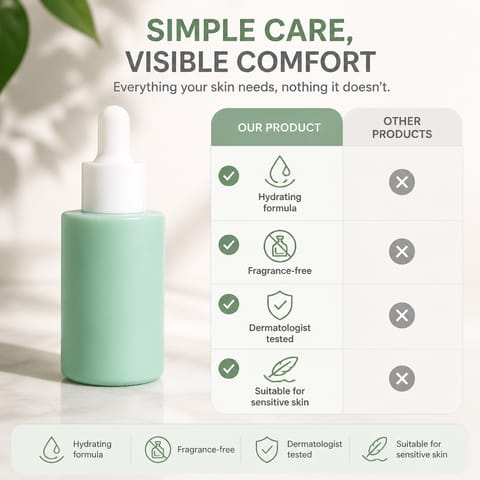
Product feature infographic
What you get
Create product infographics with feature callouts, benefits and specifications, then finish your design in Canva.
- Product feature callouts
- Benefits and specification graphics
- Infographics for product listings and social posts
Made for
Each button opens the matching Canva design type with Product Infographic ready in the side panel.
Instagram post
Product listing infographics
Explain key features alongside your product photo.
Poster
Product benefit posters
Highlight the benefits that help shoppers choose.
Presentation
Product presentation slides
Present specifications and features in a visual format.
How to use Product Infographic in Canva
- 01
Open in Canva
Click “Open in Canva”. A new design opens with Product Infographic in the side panel — sign in to Canva first if asked and you will land back in the app.
- 02
Generate
Upload a product photo, enter its features and choose an infographic layout, then generate.
- 03
Edit
Results are added to your page as regular Canva elements. Resize, recolor, add text and export the way you always do.
More apps for Canva
All apps →
ProductShot
AI product photography inside Canva: studio shots, background swaps, campaign visuals, shoppable infographics and marketplace listing sets.

Listing Image AI
Generate a full set of marketplace listing images from one product photo, then adjust text and layout in Canva.

Packshot Maker
Clean, consistent packshots from a single product photo — front, angle and detail views on a neutral background.
Pricing & credits
Start free, pay only for what you generate
Free credits to start
New accounts start with free credits — no card required to try an app.
Cost shown up front
Every app shows the credit cost before you generate, so nothing is charged by surprise.
One shared balance
All 1Bit AI apps for Canva draw on the same credit balance.
Cancel any time
Manage or cancel your plan from your 1Bit AI account. Renewal stops; your current period keeps working.
Frequently asked questions
No. The apps work with a free Canva account. Canva Pro features you already have, such as Brand Kits and premium elements, keep working on whatever the app adds to your design.
Still stuck? Contact support · Privacy policy · Terms of service · Refund policy
1Bit AI apps for Canva are built by 1Bit AI and work in Canva through the Canva Apps platform. They are not made, sponsored or endorsed by Canva. Canva is a trademark of Canva Pty Ltd.