
Create Social Media Graphics with AI
Build a consistent campaign visual kit with AI-generated brand graphics and social posts.
Create Social Media Graphics with AI: Your Complete Campaign Kit Tutorial
Learn how to create a complete social media campaign visual kit using only an AI image generator. This step-by-step guide shows designers, marketers, and creators how to generate consistent brand visuals, campaign posts, and marketing assets with AI—saving hours of design time while maintaining professional quality. Discover how tools like 1bit AI Image Generator can transform your social media workflow.
Generate AI Images New users get free credits to try it. Example of AI-generated social media campaign visuals created with consistent branding
Quick Answer: How to Create Social Media Graphics with AI
Yes, you can create all your social media images with AI by following a systematic approach: define your brand kit, create prompt templates, generate consistent visuals, and assemble your campaign assets. The key is using the right AI social media post generator with proper prompting techniques for marketing visuals.
- Start with a clear brand kit including colors, style, and tone
- Create reusable prompt templates for different post types
- Use negative prompts to maintain consistency across all visuals
- Batch generate variations, then refine and assemble your kit
Table of Contents
- Planning Your AI Social Media Campaign
- Step-by-Step: Create Your Complete Social Media Kit
- How to Make Consistent Brand Visuals with AI
- FAQ
Planning Your AI Social Media Campaign: What You Need First
Before you start creating social media graphics with AI, proper planning ensures consistent results. Many marketers ask, "Can AI generate all my social media images?" The answer is yes—if you provide clear direction. Start by defining your campaign goals, target audience, and visual requirements.
Your brand kit AI generator workflow begins with establishing visual guidelines. Document your brand colors, typography preferences, image styles (photorealistic, illustration, minimalist), and content pillars. This foundation helps your AI marketing visuals tutorial produce cohesive assets that strengthen brand recognition across platforms.
Use 1bit AI Image Generator when you want a faster workflow
Instead of searching stock photos or hiring designers, use an AI social media post generator to create custom visuals in minutes. With 1bit AI Image Generator, you can experiment with different styles while maintaining brand consistency—perfect for testing campaign concepts before finalizing assets.
Generate AI ImagesStep-by-Step: Create Your Complete Social Media Graphics with AI
Follow this practical tutorial to build a complete social media campaign kit. This AI marketing visuals tutorial covers everything from initial concept to final assets, answering "How to create a social media kit with AI?" with actionable steps.
7 Steps to Your AI-Generated Social Media Kit
-
Define Your Visual Foundation
Create a style guide document with: primary/secondary colors, image style (e.g., "bright lifestyle photography with warm tones"), aspect ratios for each platform, and key visual elements.
-
Build Your Prompt Library
Create template prompts for different post types. Example: "[Style] photo of [subject] in [setting], [lighting], [color palette], social media post, professional marketing visual"
-
Generate Core Campaign Images
Using your AI image generator, create 5-7 hero images that represent your campaign themes. Generate multiple variations of each to select the strongest options.
-
Create Platform-Specific Assets
Adapt your best images for different formats: square posts for Instagram, landscape for Facebook, vertical for Stories, and banner sizes for LinkedIn.
-
Develop Supporting Visual Elements
Generate backgrounds, textures, icons, and decorative elements that match your campaign style for use in carousels, infographics, and templates.
-
Test and Refine
Review your generated visuals for consistency. Use inpainting or regeneration features to fix any inconsistencies in style, colors, or quality.
-
Organize Your Final Kit
Create folders for each platform and asset type. Include your prompt templates for future campaigns and document what worked best.
 AI-generated variations for a coffee brand campaign showing consistent style across different post types
How to Make Consistent Brand Visuals with AI: Pro Tips
The biggest challenge when you create social media graphics with AI is maintaining visual consistency. Users often ask, "How to make consistent brand visuals with AI?" Here are proven techniques used by professional marketers.
Consistency Challenge Traditional Solution AI Generator Solution Color Palette Matching Manual color correction in Photoshop Include hex codes in prompts: "brand colors #FF6B35 and #004E89" Style Consistency Hire one photographer/illustrator Use consistent style descriptors: "flat illustration style, minimal details" Character Continuity Use same model across shoots Create character sheets with detailed descriptions for AI Brand Element Integration Manual placement in design software Generate images with "space for text overlay in top right"Common Pitfalls to Avoid
- Vague prompts: "modern design" is too broad. Use "minimalist tech aesthetic with blue gradient background"
- Ignoring negative prompts: Exclude unwanted elements like "no text, no watermarks, no blurry areas"
- Inconsistent sizing: Always note aspect ratios in your prompts for different platforms
- Over-editing: Sometimes the first generated image has the best authentic feel
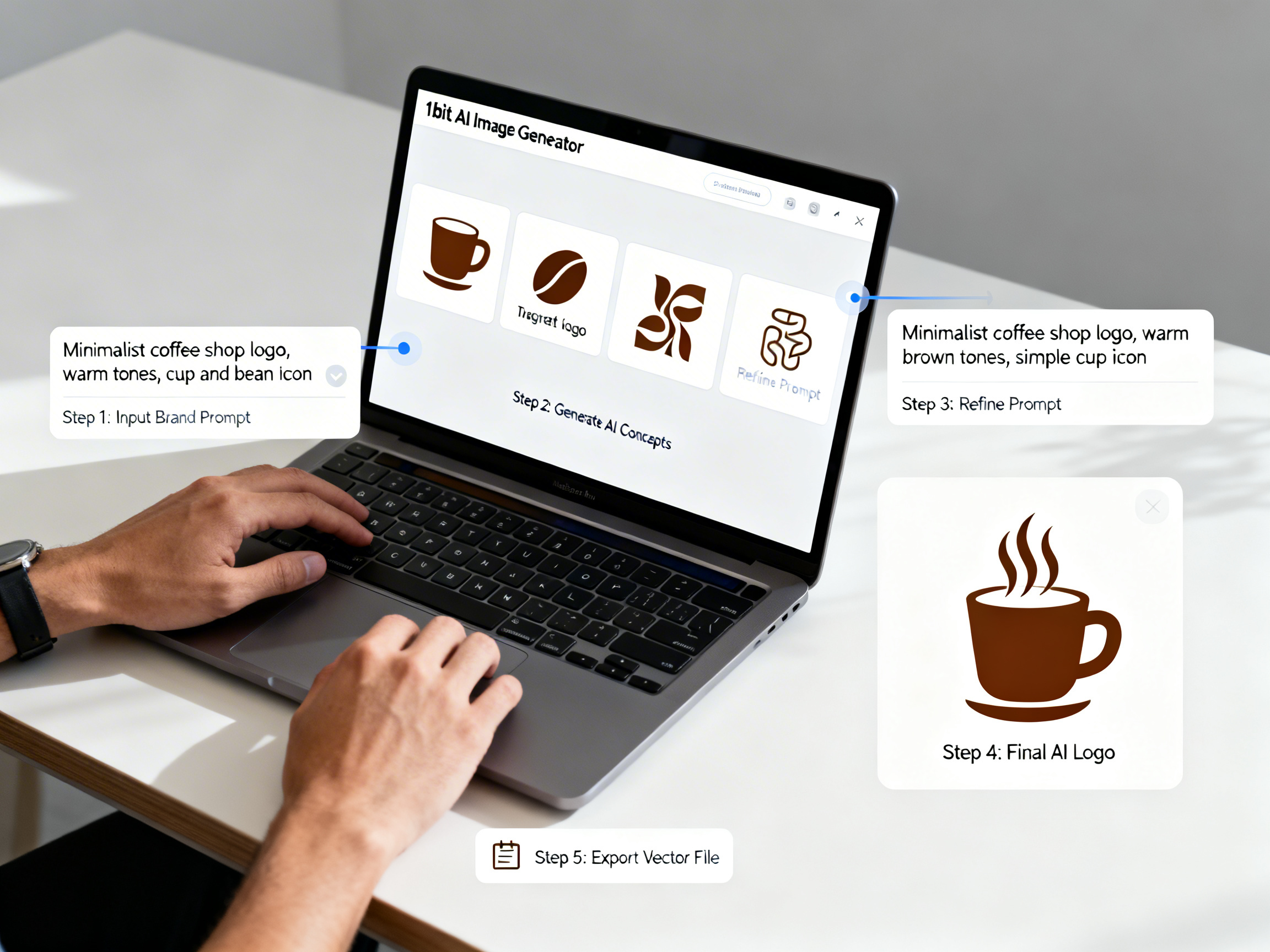 Practical demo visual for this tutorial workflow.
FAQ: Create Social Media Graphics with AI
What AI tool is best for social media marketing?
The best AI social media post generator offers consistent style output, multiple aspect ratios, and commercial licensing. 1bit AI Image Generator provides these features plus free credits for new users to test campaign concepts before committing.
Can AI generate all my social media images?
Yes, AI can generate all core visual assets for a social media campaign. However, you may need to combine AI-generated images with text overlays and branding elements in a simple design tool for final polish and platform optimization.
How long does it take to create a full campaign kit with AI?
A complete 15-image social media kit typically takes 2-3 hours with AI versus 2-3 days with traditional methods. The time savings come from instant generation and easy iteration on concepts that would require reshooting or redesigning manually.
Are AI-generated social media images copyright-free?
Most professional AI image generators, including 1bit AI, provide commercial licenses for generated content. Always check the specific terms of service, but generally you can use AI-generated images for marketing campaigns, social media, and commercial projects.