
DIY Virtual Staging with AI Image Combining
Mix room photos and furniture references to preview interior styles and staging ideas.
Visualize Your Dream Home: DIY Virtual Staging with AI Image Combine
Buying furniture is stressful. You see a velvet armchair online that looks perfect, but will it actually match your living room rug? Or perhaps you want to see what your kitchen would look like with a marble texture instead of wood?
Stop guessing and hoping for the best. With the 1bit AI Image Combine, you can become your own interior designer. By blending object images with environment photos, you can visualize changes in your home instantly.
Why Use AI for DIY Interior Design?
Professional rendering software is expensive and hard to learn. 1bit AI simplifies this process into a "drag-and-drop" experience. It allows you to:
- Test Furniture: Place a catalog item into a photo of your actual room.
- Swap Textures: Combine a fabric swatch with a sofa to see the new pattern.
- Mix Styles: Merge "Industrial Loft" images with "Boho Chic" images to find a middle ground.
How to Style Your Room in 3 Steps
Scenario 1: The "Will it Fit?" Test
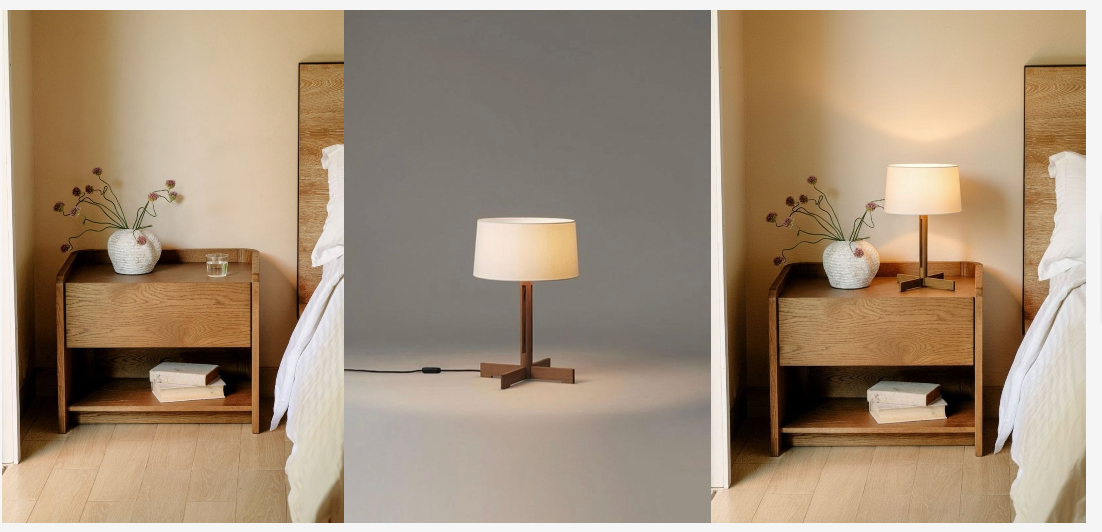
You found a vintage lamp online. You want to see it on your bedside table.
- Upload Image A: A photo of your bedroom nightstand.
- Upload Image B: The product photo of the lamp.
- Prompt: "A realistic bedroom nightstand featuring a vintage brass lamp, warm lighting, photorealistic."
Use AI to see how new furniture looks in your existing space.
Scenario 2: Texture Swapping
You have a design for a chair, but you want to see it in leather instead of fabric.
- Upload Image A: The chair.
- Upload Image B: A close-up of brown leather texture.
- Prompt: "A modern armchair upholstered in brown leather material, 4k resolution."
Tips for Best Results
- Lighting Matters: Try to pick images that have somewhat similar lighting directions.
- Be Specific: In the text prompt, describe the final result you want (e.g., "living room," "cinematic lighting," "cozy atmosphere").
- Experiment: The AI Image Combine is designed for creativity. Don't be afraid to mix unexpected items!
Start Designing Today
You don't need a degree in architecture to visualize a beautiful home. Unlock your inner designer and transform your space today.